
Comparable Casino Apps in the UK
If you are into mobile gambling, you already know the UK market has loads of options. We have built the Rollino app with UK players in mind, but hey — comparing is fair game. Checking out other platforms shows you what sets us apart. Below is a rundown of casino apps that British players use quite often.
These apps have all made a name for themselves with UK gamblers for one reason or another. A few of them bet big on live tables, others pack in hundreds of slots, and some try to win you over with faster withdrawals. What we like about the Rollino app download is how straightforward everything feels — it loads quick, looks clean, and the games are easy to find without scrolling forever. Line them all up and the differences pop out right away. That kind of clarity goes a long way when you are picking where to play.
Rollino App Overview
Putting the Rollino app on your phone is dead simple and takes about two minutes tops. The platform came out in 2023 and has been growing its fanbase among UK gamblers since then. It works on Android and iOS, so your phone brand really does not matter here — you get the same stuff either way. Here is a quick look at the specs and what your device needs to run it smoothly.
| Detail | Info |
| Operator | Altacore N.V. |
| Licence | Curacao eGaming |
| Android Version | 6.0 or higher |
| iOS Version | 12.0 or higher |
| Free Storage Needed | 100–500 MB |
| RAM | 2 GB minimum, 4 GB recommended |
| Connection | 3G, 4G, LTE, or Wi-Fi |
| Price | Free |
| Total Games | Over 5,000 |
| Game Providers | 60+ including Pragmatic Play, Evolution, NetEnt |
| Payment Methods | Visa, MasterCard, Skrill, Neteller, Crypto |
| Customer Support | 24/7 Live Chat and Email |
After you grab the Rollino APK on Android or sort out the iOS install, the full game library opens up just like on a computer. Slots, live dealers, sports bets — all of it sits right there on your screen. The Rollino app download is lightweight too, staying under 500 MB, so it will not clog up your storage. If you are a UK player who likes a quick spin on the commute or a cheeky bet at lunch, this setup keeps things neat and tidy.
How to Download Our APK on Android
Google Play does not allow gambling apps, so we are not listed there. Not a problem — you can grab the Rollino APK download directly from us. Just make sure your Android is version 6.0 or above and you have got roughly 100–150 MB free. One thing before you start: go to settings and switch on installs from unknown sources. Sounds dodgy but it is totally normal for apps outside the Play Store.
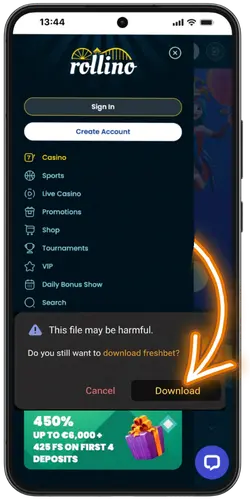
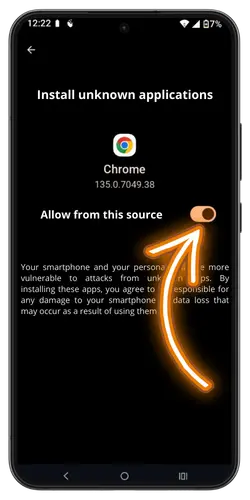
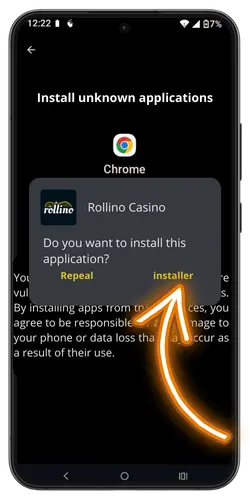
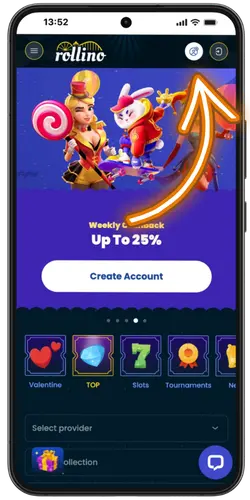
The Rollino APK Android download takes a couple of minutes at most. After that, slots, live games, and sports bets are all right there — no browser needed. Something not working? Check your unknown sources setting and make sure you have got enough storage.
Rollino iOS App Installation
Apple is just as strict as Google when it comes to gambling apps, so the App Store is a no-go. But do not worry — the Rollino iOS download works through a different route and it is still pretty straightforward. Just check you are running iOS 12.0 or later and have got around 100 MB going spare. The whole thing uses a configuration profile, which is just Apple’s way of letting you install apps from outside their store. Sounds techy but honestly it is not.
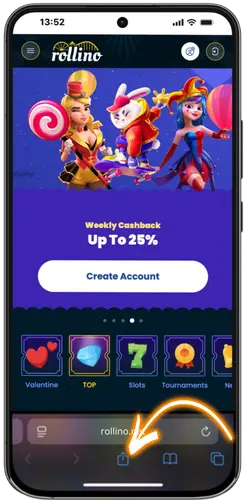
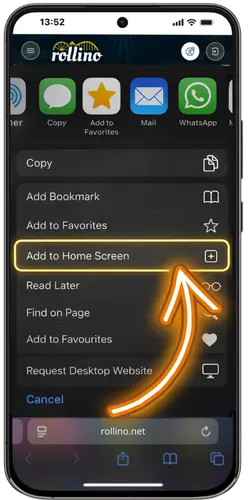
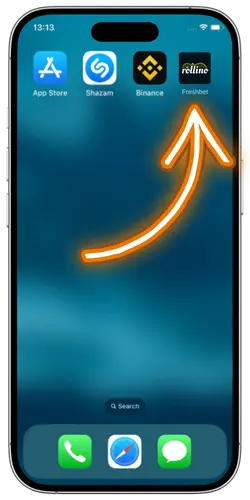
The whole Rollino app setup is done in under 2 minutes. Once the profile is trusted, the app works just like any other on your phone. Full game library, deposits, withdrawals, live chat — everything is there. If you hit a snag, make sure your iOS is up to date and you have got decent Wi-Fi. Usually fixes most hiccups.
App Store Requirements and Supported iOS Versions
Got an iPhone or iPad? It will probably run the app just fine. We kept the requirements low on purpose, so most Apple devices from the past few years can handle it no problem. Here is a quick look at what you need.
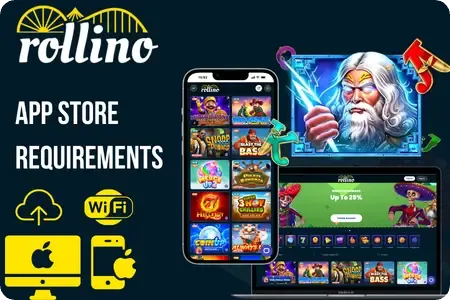
- iOS Version — You want iOS 12.0 or newer on your device. Not sure what you have got? Check under Settings > General > Software Update.
- Compatible iPhones — Got an iPhone 6s or anything newer? You are good. Pretty much covers everyone unless your phone belongs in a museum.
- Compatible iPads — Air 2, Mini 4, Pro models — all of these do the job. Anything with iOS 12 on board will run it no problem.
- Free Storage — Around 100 MB should do it. Bit of extra space on top helps when updates roll out.
- Internet Connection — Grab some decent Wi-Fi or 4G before you play. Live tables and cash transactions get grumpy with weak signal.
Download Size Updates and Permissions
Before you grab the Rollino app download, it is worth knowing what you are getting into. Nothing complicated here — just a few bits of info that might save you a headache later. We kept the app lean on purpose so it does not hog your storage or slow your phone down. Have a look at the cards below to get the full picture.
So yeah, pretty standard stuff all around. The app stays light, updates come out without any fuss, and we only ask for permissions that actually make sense. No sneaky background processes or weird data grabs — just what we need to keep things running properly. Any modern phone with a bit of free space will run it no problem.
Troubleshooting iOS Installation Issues
Something not working with the Rollino app iOS install? Honestly, most problems take less than a minute to fix. Usually it is just a setting you missed or your Wi-Fi acting up at the worst time. Tap the cards below — find what went wrong and get it sorted.
Make sure you are using Safari — other browsers block profile downloads. Also check your Wi-Fi is stable and try again.
Tap to flipHead to Settings > General > VPN & Device Management. Find the Rollino profile and tap Trust. Done — the app will open now.
Tap to flipYour iOS might need an update. Go to Settings > General > Software Update and grab the latest version. Restart your phone after that.
Tap to flipDelete the half-installed profile from Settings, restart your device, and try the whole process again on a stronger connection.
Tap to flipFree up at least 150 MB. Clear old photos, delete apps you do not use, or offload some games. Then give it another go.
Tap to flipProfiles need a refresh now and then. Delete the old one, head back to our site, and reinstall the latest version. Takes two minutes.
Tap to flipMost issues boil down to something small — a setting that got missed or a flaky internet connection at the wrong time. If none of the fixes above did the trick, drop us a message through live chat and we will get you sorted. Our support team is around 24/7 so you will not be waiting long for a reply.
App Updates Performance and Security
Once the Rollino app lands on your phone, we do not forget about it. Things break sometimes, we fix them. New features come up, we add them. Your data? Stays between us — no selling, no sharing, no dodgy stuff. We actually care how the app runs for you, not just on launch day but months down the line.
We roll out fresh versions every few weeks with new features and bug fixes. You will get a heads up inside the app when something new drops.
Games load quick, menus respond instantly, and live streams run without stuttering. We test on older phones too so nobody gets left behind.
Your personal info and payment details stay protected with SSL encryption. We never share your data with anyone outside our platform.
All games come from licensed providers and use certified random number generators. What you see is what you get — no funny business.
No one wants to deal with a slow app or worry about their bank details floating around. We get that, so we stay on top of it. Updates drop regularly, security gets checked, and performance stays snappy.